Oh wow. I do remember I actually wrote some programmes on that. I won’t even try and out geek anyone as it would just get embarrassing.
Re Apple: I have some Apple kit but don’t use it for development. Way too expensive to own and all proprietary. I also miss the right click (and/or keyboard).
Not so much these days. Apple are moving to USB-C for power and data (2015 MacBook). The OS is built on FreeBSD and is full of open-source software (Apple is a massive contributor to open-source - in particular with projects like WebKit). USB, Bluetooth, Wifi, Thunderbolt/DisplayPort - all standards that Apple has followed. Standard Intel chips and busses. Their new Swift language is open sourced and has a compiler for Linux.
That was true of the old mouse and might still be of whatever ships with a Mac. The Magic Mouse, however is fully programmable for left and right clicks. I don’t use an Apple mouse but a Logitech one. All compatible and right click menus all accessible. I’d say it’s been that way for at least five years.
The Magic Mouse is quite lovely - let alone left and right click capability, the top surface is a capacitative touch panel which you can use for scrolling precisely in any direction.
On a Mac touchpad, you right click by putting two fingers on the pad and clicking.
More touchpad gestures here:
Once you get used to them, it’s hard to imagine how you lived without them.
Quite the opposite for me, @chris. I used mine for about a year before giving up on it. I appreciate all the exquisite design, but I’m not a gestures kinda gal, and the sensitivity of the capacitive top panel was too much for me. I ended up turning off lots of features because I was losing work with careless swipes. Also, Bluetooth is one of Apple’s weak points and I often had to clear out plist files and other nonsense to get it working properly.
When my MM went kaput I borrowed my son’s cheap n cheerful Logitech mouse with a plug in dongle for connecting and found I much preferred it.
My geekiness has reached a new level now, and I have decided my FitBit Blaze is just not cutting it for my activity tracker needs.
So succumbed to a Garmin Forerunner 230.
My inner nerd knows no bounds lol !
Anyone else track their activities?
Less interested in daily steps these days as after a long period of monitoring, I know what i average.
I’ve just got a Fitbit Charge HR. A lot more sophisticated the Jawbone Up I bought a few years ago. The reporting in the app is quite impressive. I’m interested to see how having the dog has increased my activity. Despite being a regular at the gym, I rarely made 10k steps a day previously. Today I hit that by lunchtime.
The sleep monitoring is also very useful and I am going to map sleep (or lack thereof) with mood. I expect to find a correlation and motivation to get to bed earlier!
I found the data from my UP and UP2 quite interesting, and realised from that how much I was doing some days. 42,000 was my highest I think, around 22 miles.
The Blaze with the 24/7 HR tracking has been fantastic as I have returned to fitness. Seeing my resting HR drop and drop. Now at a good level and steady, it’s time for me to move on.
I can honestly say the devices have really motivated me over time, and as you say @RachaelDunlop , can really confirm they have shaped my lifestyle somewhat.
I have to admit I want some more wearable, but still not convinced the Smart watch market is quite ready for me. Tried a few over time, and have yet to find love.
I use a Polar M400 for running (HRM/GPS) and activity (and telling the time and getting updates from my phone) and a Polar M450 for cycling. They have regular firmware updates as well as updates to the web portal. Some really interesting data, and there is a new feature on the watch that gives a training plan for upcoming events (eg half marathon) which I’m considering taking advantage of (read: entering a race).
As fellow Apple fanatics probably know, Monday is the opening day of Apple’s annual developer conference, WWDC. The keynote address has been used to launch some of Apple’s biggest innovations over the years. It’s Christmas Day for fanboys like me.
This year I think we’re finally going to see a next-generation MacBook Pro and I’m really excited about the rumoured feature set.
Unlike PC manufacturers, Apple focuses its energy on designing just one or two flagship models, and the company therefore stakes its whole reputation on a product like the MacBook Pro - meaning it has to be good.
Fingerprint Reader
TouchID works brilliantly on iDevices and it makes sense to have it on the Mac. Obviously this isn’t revolutionary - some PC laptops have had fingerprint readers for years. But Apple’s highly accurate and secure implementation (hardware segregation at the CPU level) has led to banks trusting the technology, so we’ve seen strong third party support from apps in the App Store. That’s the clincher.
With Apple, it’s not about hardware innovation for the sake of it - it’s about getting the software / content ecosystem onboard at the same time, to make the innovation genuinely useful for customers.
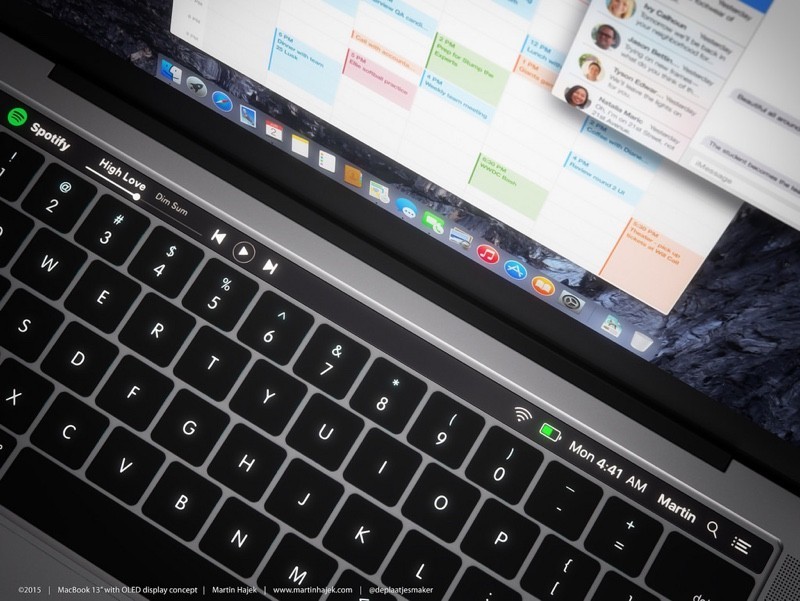
OLED keyboard strip
The other nice rumoured feature of the new MacBook Pro is an OLED touch panel on the keyboard that’s context sensitive: